B
PredictBASS
Acoustical planning software for BASSBOSS Subs
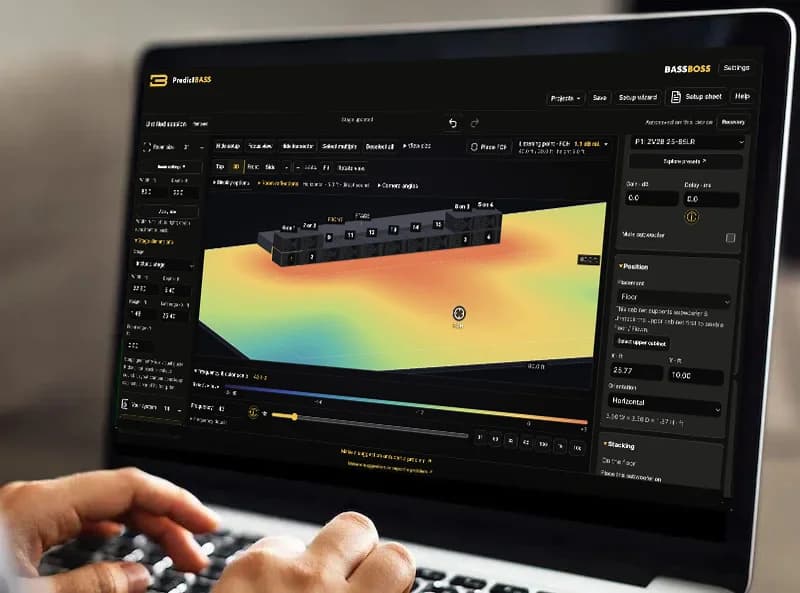
Interactive subwoofer modeling for system design, placement analysis, and exploring low-frequency acoustics.
Plan the perfect gig with ease. See where your subs hit, where they cancel, and which setup works best for your event.
Free with a bassboss.com account. Two ways to plan:
1 · Plan in your web browser
Sign in via magic link, no password.
2 · Get the Mac or Windows app
Get the appsiPad and iOS coming soon.
macOS 13+ · Windows 10+
Same Subs, New Moves
Same cabinets, completely different performance. Center cluster, line across the stage, or stack on each side: every placement changes your low-frequency coverage.
Add your BASSBOSS subs to visualize cancellation and summation based on location and stacking: showing you exactly where they work together and where they fight.
Works with all BASSBOSS subwoofers.
Placement examples · 63 Hz
PredictBASS shows relative bass coverage, not SPL.
Plan in the platform, confirm your performance on site. Tops + monitors will be added in the future.
Find theSweet Spot
Move the listening point to examine predicted bass response at different locations. Set the listening height and compare how placement and processing affect your results.
Pick YourFlavor
Every supported sub comes with its factory presets, explained in plain language.
Preview before you choose: compare presets and filter curves to see how they change performance in your setup. Cardioid settings included.
StudioBASS preview
Smaller Room,Bigger Bass
Create a room, add a desk and chair, and see the subwoofer bass performance in your home studio or living room. StudioBASS and PredictBASS setups are separate, so switching never costs you work.
Plan It. Share It.OWN It.
Save named projects and keep your alternatives instead of rebuilding them from memory. In the browser, projects live in your BASSBOSS account, in folders. On desktop, save them locally and plan offline.
Ready to load in? Send the PredictBASS file to your team before a gig, or just the setup sheet: a scaled overhead plan with every cabinet position, preset, gain, and delay.
Happy with a rig? Add setup to cart sends it to your bassboss.com account: save a quote or talk with our team.
Pick YourPlatform
Web: Make a bassboss.com account, open it in your browser and get visualizing your next gig.
Mac and Windows: plan offline with local projects. Mac: Apple silicon and Intel. iPad + iOS coming soon.
VenueBASS iscoming soon!
Define dance floors, audience, and bar zones, arrange furniture, and compare predicted low-frequency coverage across your venue.
FAQ
Is PredictBASS free?
Yes, with a BASSBOSS account. Sign in with a link sent to your email.
Do I need to connect my speakers?
No. PredictBASS changes the simulation, never the settings on a real speaker.
Can I use it offline?
Yes, in the Mac and Windows apps. Your account projects, the community and the cart need an internet connection.
Does it predict tops?
Not yet. The prediction covers supported BASSBOSS subwoofers only.
Can PredictBASS be used to learn acoustics?
Yes. Compare changes in frequency, spacing, delay, and presets to explore how subwoofer sources combine. The visualizations and listening-position response provide a practical way to investigate low-frequency behavior.
Who is PredictBASS for?
System designers, production teams, DJs, venue operators, studio users, and anyone investigating BASSBOSS subwoofer placement and response. It also helps dealers and customers discuss a system using the same saved plan.
Does the coverage map show measured SPL?
No. It shows predicted relative low-frequency coverage. It is a planning and comparison tool; confirm the installed system with on-site listening and measurement.